Summary
Learn how to create WordPress security reports clients understand: impact, actions taken, remaining risks and the value of your monthly service.
If you provide WordPress maintenance for clients, you probably do more security work than your clients ever see.
You review alerts, update plugins, block suspicious activity, harden settings, check site status and look for anything unusual. But if all that work ends up as "the website is secure" or as a technical table nobody reads, the value disappears.
The issue is not only doing security work. The issue is explaining it.
A good WordPress security report should answer three simple questions:
- What happened.
- What was done.
- What should be monitored or decided next.
Why technical reports often fail clients
Security teams use useful scoring systems such as CVSS to prioritize vulnerabilities and compare severity.
That is useful for technical work.
But most clients do not need a score first. They need impact.
Instead of sending a raw table of events, a clearer report says:
Multiple unauthorized login attempts were detected this month. The related IPs were blocked, the website remained operational and we recommend keeping the current access restrictions in place.
That sentence does more than inform. It shows control.
What a useful WordPress security report should include
A client report does not need to be huge. It needs to be readable.
A practical structure:
1. Executive summary
Explain the general status in plain language.
Example:
During this period, the site was monitored for security activity, suspicious events were reviewed, malicious IPs were blocked and no incident affecting site availability was detected.
2. Relevant activity
Do not list everything. List what matters.
Examples:
- Brute force attempts against the login page.
- Suspicious activity on sensitive URLs.
- Relevant plugin, theme or user changes.
- Blocked IPs.
- Alerts reviewed or resolved.
The goal is not volume. The goal is visibility.
3. Actions taken
This is where the value of your maintenance service becomes clear.
Show concrete work:
- IPs blocked.
- Mitigation rules applied.
- Hardening settings reviewed.
- Alerts analyzed.
- Site status checked.
- Evidence saved for reporting.
Invisible work becomes visible work.
4. Remaining risks or next steps
A credible report does not pretend everything is perfect.
Examples:
- Repeated login attempts should continue to be monitored.
- Admin users should be reviewed monthly.
- XML-RPC should remain disabled if it is not needed.
- Recurring activity from specific IP ranges should be watched.
Clients do not need magic. They need judgement.
5. Final recommendation
End with a clear recommendation.
Instead of "we will keep monitoring", write:
We recommend keeping the current blocking rules, reviewing administrator users once a month and continuing to monitor login activity.
That gives direction.
What a security report should not be
A client-facing security report should not be:
- A raw log export.
- A long table without conclusions.
- A list of acronyms without explanation.
- A document only another technician understands.
- A polished PDF with no real actions behind it.
It should also avoid absolute promises. No serious agency should claim a website cannot be attacked.
The right promise is visibility, response, judgement and continuous improvement.
Why this matters for WordPress agencies
When you manage one website, manual review is possible.
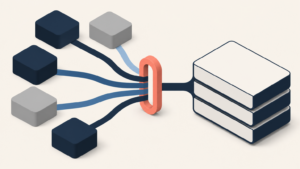
When you manage 20, 50 or 100 WordPress sites, the problem changes. You need centralized visibility.
Which sites had alerts.
Which IPs were blocked.
Which clients need attention.
Which activity should appear in the monthly report.
What proves the value of your service.
Many agencies do not lose time because they lack technical knowledge. They lose time because they lack a system.
How Vulnity fits into this workflow
Vulnity is built for agencies and professionals managing multiple WordPress sites who need a centralized way to monitor security activity.
Instead of checking every website manually, Vulnity helps centralize visibility around:
- Alerts and suspicious events.
- Connected site status.
- IP blocking.
- Applied mitigations.
- Hardening settings.
- Information useful for client reports.
The goal is not to replace the agency's judgement. It is to give the team a clearer base to operate and explain its work.
Because if the client cannot see what you do, it is harder for them to understand why they pay for it.
And if your team cannot see what is happening across all sites, it is harder to prioritize well.
Conclusion
A good WordPress security report does not need to be longer. It needs to be clearer.
Less technical noise.
More impact.
More actions.
More context.
And a conclusion the client can understand.
If you manage multiple WordPress sites for clients and want to make security more visible, organized and easier to explain, Vulnity helps centralize alerts, IP blocks, hardening and reports from a single panel.
Final CTA:
Try Vulnity and see how to centralize WordPress security without checking every site one by one.

About Vulnity
If you manage WordPress sites, alerts like this become urgent operational work. Vulnity helps centralize visibility, review hardening, and react faster across your sites.